Introduction
Spring 2019
This system allows two designers to collaborate in a VR environment.
The hardware aspects of the system include two VR headsets and LeapMotion devices. The software aspects of the system include using LeapMotion to program hand gestures to correlate with actions for writing and creating 2D & 3D objects/prototypes in the space.
Project Motivation
For my capstone, I was interested in creating a VR Collaborative Workspace that would help designers plan and brainstorm. In researching this space, I have found similar products including Spatial & MeetinVR. These systems inspired me to envision a world where designers from around the world could work collaboratively without leaving their home offices.
Process Documentation
The project process is documented in the following two slideshows, which steps through the timeline of the semester for the technical aspects of the project as well as brainstorming for the user experience.
Mid Semester Progress Presentation


The primary technical hurdle for the project was networking the hand data from User B into User A's world.
Beginning in April I began using Open Sound Control for networking the data. However, I started with using extOSC which is a package that have an intuitive user interface but also uses TCP protocol, so if data was dropped accidentally over the network User B's hands would glitch horribly in User A's world.
Towards the end of April I started using uniOSC which uses UDP protocol instead and was thus very comfortable with dropping packets and did not send invalid data accidentally. Each hand has five fingers, which each have about 3 joints that need to have their vec3 position and vec3 rotations sent over the network. Thus a lot of data ended up being sent over the network for both of User B's hands to be sent into User A's world and for User A's hands to be sent into User B's world.
Once the hands showed up I started working on interaction between blocks. However, for an interactive block to exist in both User A's Instance of the world and User B's Instance of the world, then I needed to basically set the block as both a client and a server. Due to time constraints I instead worked on getting drawing to work, and after examining LEAP Motion's API for pinch drawing I simply set a minimum distance between the end of the index finger and the end of the thumb. If that minimum threshold was crossed, a sphere would be created.
For drawing I realized that if we keep every sphere that a user 'draws' then there will be hundreds of objects in the scene eating up processing power. Thus I created a time limit for the spheres to exist before disappearing. This solved the processing issues, however, when I tested this feature with my first users they both remarked that they wanted their drawings to not disappear. Therefore I removed the time limit on the spheres and instead had to put a time limit on the users so they would only be in the world for 1 minute. If they stayed any longer the graphics would begin to glitch.
User Testing
In the experiment two people were asked to collaboratively design a chair, desk and lamp in one minute. They were given three attempts.
Seven groups of participants went through the experience, then they submitted a survey and given a brief interview (as shown above).
Below is a list of aspects of the experience that they enjoyed:
-
"It is novel to draw in a three dimensional way."
-
"We didn't need instructions to learn how to draw. It was really intuitive."
-
"The time constraint made it so that we needed to work together."
-
"The environment felt very real because how good the [hand] tracking was. Also it was really interesting how we were at opposite ends of the room but it felt like we were just next to each other because of how the world was set up."
-
"I like how we had to communicate with each other to decide on what to draw next."
-
"The music was excellent."
-
"The hand tracking was a really cool application of things."
Below are the instructions that the participants
were given.
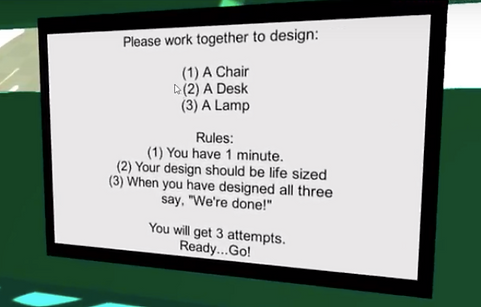
Below are the questions and responses to the survey that each participant filled out after the experiment:
-
Would you rather have this experience on your own or with a partner?
100% of participants replied, "a partner," and one person said with "multiple partners."
-
What was the power dynamic like between you and your partner?
Most participants wrote "balanced", "even," "collaborative," "cooperative," or "lots of communication between both of us." However, there was one group that responded, "I was bossy and geegates," and "I was being told what to draw a chair while my partner drew table and lamp."
-
What do you think this system could be used for?
Three people said "team building," "ice breakers," or "to aid with communication." Two people said "for fun." Five people said design including "Furniture design," "design(industrial, interior, etc...)," "Art," "3d modeling," and "To build design in 3D, for example for buildings, or to design a maze others have to move through, or Pictionary, or for education purposes like teaching art or first dates."

Figure 1. Instruction Clarity
1=not clear, 5 = very clear
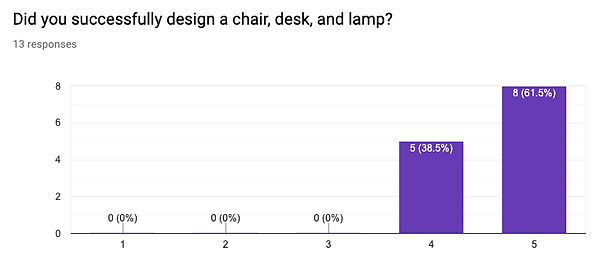
Figure 2. Design Success
1=no, 5 = yes
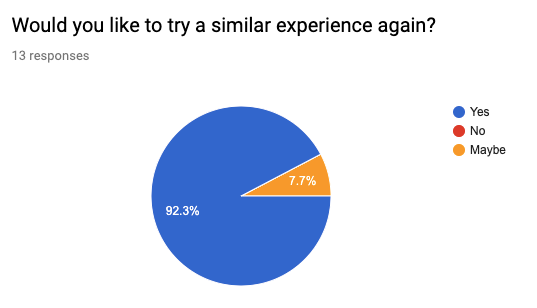
Figure 3. Total Experience
Suggested Improvements
The next steps for the project thus include:
-
Provide ability to erase.
-
Use thicker lines instead of dots. Potentially use a linear mesh that interpolates between frames.
-
Have a timer in the virtual space
-
Have the items (chair, desk, lamp) fit better into the world. Perhaps design a tree, or natural or space-themed object
-
Have a similar demonstration as LEAP Motion does with the animation it uses to demonstrate hand gestures.
Engineering Constraints
I primarily followed the nine IEEE standards for augmented and virtual reality. These standards which address safety, taxonomy, and interoperability. Reference link: http://theinstitute.ieee.org/resources/standards/nine-ieee-virtual-and-augmented-reality-standards-projects-in-the-works.
-
Device Taxonomy and Definitions
-
Immersive Video Taxonomy and Quality Metrics
-
Immersive Video File and Stream Formats
-
Person Identity
-
Environment Safety
-
Immersive User Interface
-
Map for Virtual Objects in the Real World
-
Interoperability Between Virtual Objects and the Real World
-
Immersive Audio Taxonomy and Quality Metrics
The primary constraint really is the comfort of the user. Glitching of any kind is not acceptable and will possibly make the user sick. Thus I focused on stability of the Leap Motion hands, especially when networked, and ease of drawing. Due to user preference discussed in the "Process Documentation" section, the users were only allowed to be in the world for 1 minute at a time. This is because after a minute, if the spheres are not destroyed, the leap motion hands glitch.
Bill of Materials:
- 2 Leap Motion Sensors ($80 each)
- 2 Oculus Rifts ($399 each)
- 2 Powerful graphics processors ($2k -3k each)
-2 PC monitors ($100 each)
Thus a 2 player system could cost about $6.2k. The primary use for a system like this would be to allow designers in different cities to collaborate without having to leave their home office. Thus this could be used to replace the cost of travel and accommodation for a designer in NYC to travel to London. Using the Kayak website, a round trip flight could cost $800 to $900, on Airbnb an apartment could cost anything between $200 and $800 for a week, and that's not even taking into account food or daily transportation. If we estimate a week traveling to the London office costing at least $1.2k, then the VR system would only need to be used 5 times to pay for itself.
